

Connect a Price Feed with Stork Oracle
Stork is a pull-based oracle protocol designed for ultra-low latency. Unlike push oracles that maintain a continuously updated on-chain price, Stork lets your contract or off-chain application fetch a price on demand, then verify it trustlessly on-chain using a signed payload.
This tutorial covers the full data flow:
- Fetch a signed price update from the Stork REST API
- Push that price on-chain to the Stork contract
- Read the verified price from your own smart contract
How Stork Works on Horizen
Stork operates as a pull oracle. Prices are not continuously pushed on-chain - instead, your application fetches a cryptographically signed price payload from Stork's API, then submits it to the Stork on-chain contract to verify and store it. Other contracts read from that stored value.
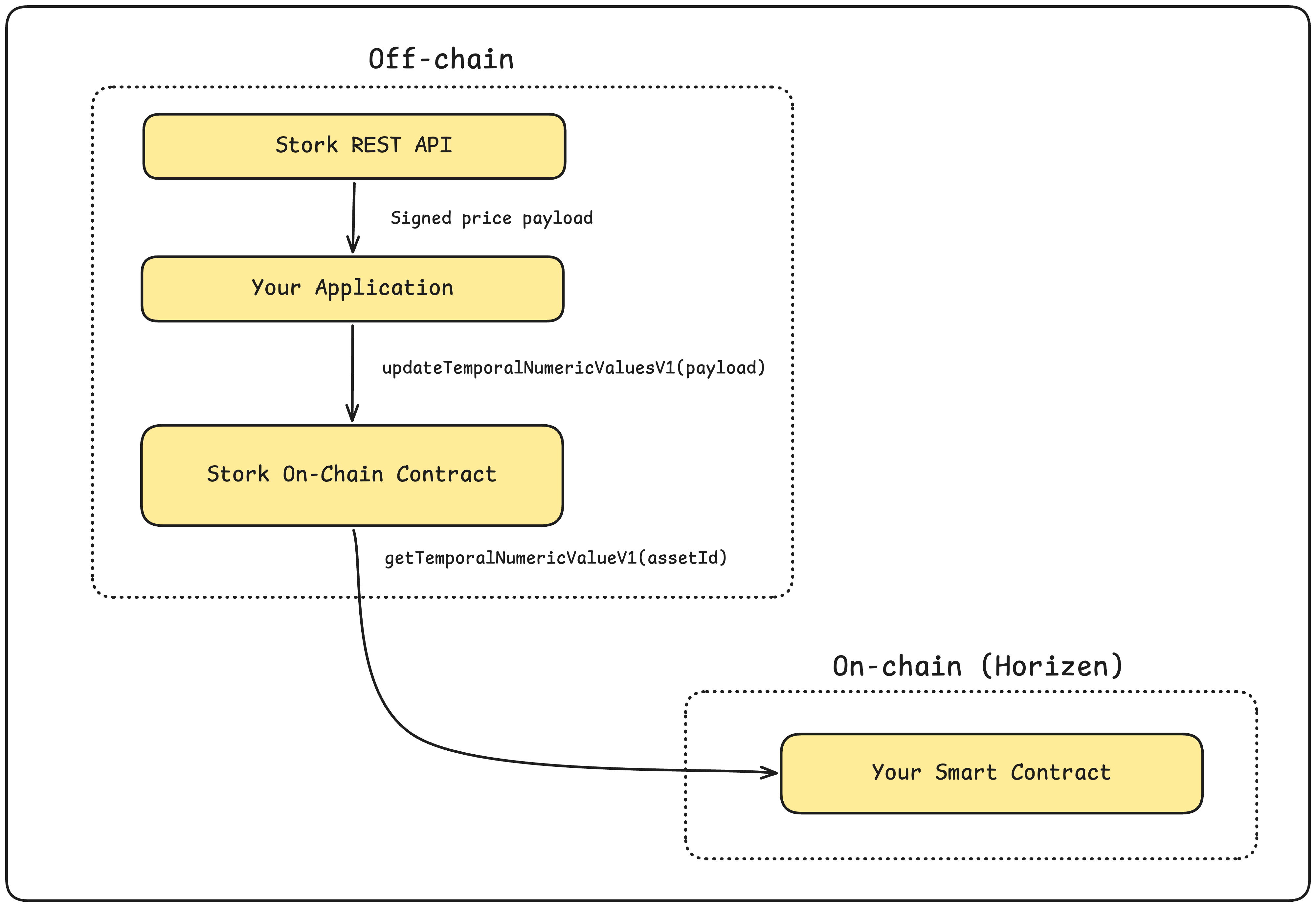
This model means gas is only spent when a price is actually needed, and freshness is guaranteed by the cryptographic signature rather than a heartbeat.
Prerequisites
- A Stork API key - request one at stork.network or their developer portal
- A deployed contract on Horizen (or you can test with an EOA and cast/ethers.js)
- Foundry or Hardhat for contract interaction
- Node.js ≥ 18
Step 1: Identify Your Asset ID
Stork identifies price feeds using an asset ID - a human-readable string like BTCUSD, ETHUSD, or ZENUSD. You can browse available feeds via the Stork REST API:
curl -u "<YOUR_API_KEY>:" \
  "https://rest.jp.stork-oracle.network/v1/prices/latest?assets=BTCUSD,ETHUSD"
The response contains the latest signed price with its encoded asset ID:
{
  "data": {
    "BTCUSD": {
      "timestamp": 1718000000000000000,
      "asset_id": "BTCUSD",
      "signature_type": "evm",
      "trigger": "delta",
      "price": "67500000000000000000000",
      "stork_signed_price": {
        "public_key": "0x...",
        "encoded_asset_id": "0x7404e3d104ea7841c3d9e6fd20adfe99b4ad586bc08d8f3bd3afef894cf184de",
        "price": "67500000000000000000000",
        "timestamped_signature": {
          "signature": {
            "r": "0x...",
            "s": "0x...",
            "v": "28"
          },
          "timestamp": 1718000000000000000,
          "msg_hash": "0x..."
        },
        "publisher_merkle_root": "0x...",
        "calculation_alg": {
          "type": "median",
          "version": "v1",
          "checksum": "0x..."
        }
      }
    }
  }
}
Note the encoded_asset_id - this is the bytes32 identifier used in all on-chain calls.
Step 2: The Stork Contract Interface
The Stork contract on Horizen exposes two core functions:
// Push a price update on-chain (verifies the signature, stores the value)
function updateTemporalNumericValuesV1(
    StorkStructs.TemporalNumericValueInput[] calldata updateData
) external payable;

// Read the latest stored price for an asset
function getTemporalNumericValueV1(
    bytes32 id
) external view returns (StorkStructs.TemporalNumericValue memory value);
The TemporalNumericValue struct returned by the getter:
struct TemporalNumericValue {
    uint64 timestampNs;    // Nanosecond timestamp of the price
    int192 quantizedValue; // Price scaled to 18 decimal places
}
Price representation: Stork prices use 18 decimal places. A BTC price of $67,500 is represented as
67500 * 1e18 = 67500000000000000000000. Divide by1e18in your application logic.
Step 3: Push a Price Update (Off-Chain Script)
Here's a complete Node.js script that fetches a fresh price from the Stork API and pushes it on-chain:
import { ethers } from "ethers";

// ── Config ──────────────────────────────────────────────────────────────────
const RPC_URL   = "https://horizen-testnet.rpc.caldera.xyz/http";
const PRIVATE_KEY = process.env.PRIVATE_KEY!;
const STORK_API_KEY = process.env.STORK_API_KEY!;
const STORK_CONTRACT = "0xacC0a0cF13571d30B4b8637996F5D6D774d4fd62"; // Horizen Stork contract
const ASSET       = "BTCUSD";

// ── Minimal ABI ─────────────────────────────────────────────────────────────
const STORK_ABI = [
  "function updateTemporalNumericValuesV1(((uint64 timestampNs, int192 quantizedValue) temporalNumericValue, bytes32 id, bytes32 publisherMerkleRoot, bytes32 valueComputeAlgHash, bytes32 r, bytes32 s, uint8 v)[] calldata updateData) external payable",
  "function getTemporalNumericValueV1(bytes32 id) external view returns ((uint64 timestampNs, int192 quantizedValue) value)",
  "function getUpdateFeeV1(((uint64 timestampNs, int192 quantizedValue) temporalNumericValue, bytes32 id, bytes32 publisherMerkleRoot, bytes32 valueComputeAlgHash, bytes32 r, bytes32 s, uint8 v)[] calldata updateData) external view returns (uint256 feeAmount)",
];

// ── Fetch from Stork API ─────────────────────────────────────────────────────
async function fetchStorkPrice(asset: string) {
  const res = await fetch(
    `https://rest.jp.stork-oracle.network/v1/prices/latest?assets=${asset}`,
    {
      headers: {
        Authorization: "Basic " + Buffer.from(`${STORK_API_KEY}:`).toString("base64"),
      },
    }
  );
  if (!res.ok) throw new Error(`Stork API error: ${res.status}`);

  // Do not use res.json(). timestampNs is a 19-digit integer; JSON.parse
  // converts it to float64 and silently rounds it. The Stork signature is
  // computed over the exact integer, so a rounded value causes the oracle
  // to revert with InvalidSignature.
  const rawText = await res.text();
  const safeText = rawText.replace(/:(\s*)(-?\d{16,})([,}\]])/g, `:$1"$2"$3`);
  const json = JSON.parse(safeText);

  return json.data[asset].stork_signed_price;
}

// ── Build update payload ─────────────────────────────────────────────────────
function buildUpdateData(signedPrice: any) {
  const { r, s, v } = signedPrice.timestamped_signature.signature;

  return {
    temporalNumericValue: {
      timestampNs: BigInt(signedPrice.timestamped_signature.timestamp),
      quantizedValue: BigInt(signedPrice.price),
    },
    id: signedPrice.encoded_asset_id,
    publisherMerkleRoot: signedPrice.publisher_merkle_root,
    valueComputeAlgHash: signedPrice.calculation_alg.checksum.startsWith("0x")
      ? signedPrice.calculation_alg.checksum
      : `0x${signedPrice.calculation_alg.checksum}`,
    r,
    s,
    v: Number(v),
  };
}

// ── Main ─────────────────────────────────────────────────────────────────────
async function main() {
  const provider = new ethers.JsonRpcProvider(RPC_URL);
  const signer   = new ethers.Wallet(PRIVATE_KEY, provider);
  const stork    = new ethers.Contract(STORK_CONTRACT, STORK_ABI, signer);

  console.log(`Fetching ${ASSET} price from Stork...`);
  const signedPrice = await fetchStorkPrice(ASSET);
  const updateData  = [buildUpdateData(signedPrice)];

  // Query the required fee (some Stork deployments charge a small fee per update)
  const fee = await stork.getUpdateFeeV1(updateData);
  console.log(`Update fee: ${ethers.formatEther(fee)} ETH`);

  // Push the price on-chain
  const tx = await stork.updateTemporalNumericValuesV1(updateData, { value: fee });
  console.log(`Transaction submitted: ${tx.hash}`);
  await tx.wait();
  console.log("Price updated on-chain.");

  // Read it back to verify
  const stored = await stork.getTemporalNumericValueV1(signedPrice.encoded_asset_id);
  const humanPrice = Number(stored.quantizedValue) / 1e18;
  console.log(`Stored price: $${humanPrice.toFixed(2)}`);
  console.log(`Timestamp: ${new Date(Number(stored.timestampNs) / 1e6).toISOString()}`);
}

main().catch(console.error);
Run it:
PRIVATE_KEY=0x... STORK_API_KEY=your_key npx ts-node push-price.ts
Step 4: Consume the Price in Your Smart Contract
Now write a Solidity contract that reads the Stork price and uses it in business logic. This example is a minimal price-gated contract that only accepts deposits when the asset price is above a threshold:
// SPDX-License-Identifier: MIT
pragma solidity ^0.8.20;

/// @dev Minimal Stork interface - only what we need
interface IStork {
    struct TemporalNumericValue {
        uint64 timestampNs;
        int192 quantizedValue;
    }

    function getTemporalNumericValueV1(bytes32 id)
        external
        view
        returns (TemporalNumericValue memory);
}

contract PriceGatedVault {
    IStork public immutable stork;

    // bytes32 asset IDs - use the encoded_asset_id from the Stork API
    bytes32 public constant BTC_USD =
        0x7404e3d104ea7841c3d9e6fd20adfe99b4ad586bc08d8f3bd3afef894cf184de;

    // Price staleness tolerance: reject prices older than 60 seconds
    uint256 public constant MAX_PRICE_AGE_NS = 60 * 1e9;

    // Minimum BTC price (in USD, 18 decimals) to allow deposits
    int192 public constant MIN_PRICE = 50_000 * int192(1e18);

    mapping(address => uint256) public deposits;

    event Deposited(address indexed user, uint256 amount, int192 btcPrice);

    constructor(address _stork) {
        stork = IStork(_stork);
    }

    function deposit() external payable {
        IStork.TemporalNumericValue memory price =
            stork.getTemporalNumericValueV1(BTC_USD);

        // Check price freshness
        require(
            block.timestamp * 1e9 - price.timestampNs < MAX_PRICE_AGE_NS,
            "PriceGatedVault: stale price"
        );

        // Check price threshold
        require(
            price.quantizedValue >= MIN_PRICE,
            "PriceGatedVault: BTC price too low"
        );

        deposits[msg.sender] += msg.value;
        emit Deposited(msg.sender, msg.value, price.quantizedValue);
    }

    function getPrice() external view returns (int192 price, uint64 timestampNs) {
        IStork.TemporalNumericValue memory val =
            stork.getTemporalNumericValueV1(BTC_USD);
        return (val.quantizedValue, val.timestampNs);
    }
}
Deploy with Foundry
forge create src/PriceGatedVault.sol:PriceGatedVault \
  --constructor-args 0xacC0a0cF13571d30B4b8637996F5D6D774d4fd62 \
  --rpc-url https://horizen-testnet.rpc.caldera.xyz/http \
  --private-key $PRIVATE_KEY
Verify the price read
cast call <YOUR_VAULT_ADDRESS> "getPrice()(int192,uint64)" \
  --rpc-url https://horizen-testnet.rpc.caldera.xyz/http
Step 5: Keeping Prices Fresh (Automation)
For production apps, you need a process that periodically pushes price updates so they're never stale when your contract checks them. Options:
Option A - Simple cron job
Run the push script on a schedule (e.g., every 30 seconds):
# crontab entry: every minute
* * * * * /usr/bin/node /app/push-price.js >> /var/log/stork-push.log 2>&1
Option B - Event-driven push (recommended)
Only push when a price update is actually needed (e.g., just before a user transaction). Have your frontend call the push script via a backend API endpoint, then submit the user's transaction:
// Frontend: push price, then call contract
async function depositWithFreshPrice() {
  // 1. Push fresh price via your backend
  await fetch("/api/push-price", { method: "POST" });

  // 2. Submit deposit transaction
  const tx = await vaultContract.deposit({ value: ethers.parseEther("0.1") });
  await tx.wait();
}
Option C - In-transaction push
Have the user's transaction include both the price update and the contract call in a single multicall. This is the most trustless approach - the price is pushed atomically with its consumption:
function depositWithPriceUpdate(
    IStork.TemporalNumericValueInput[] calldata updateData
) external payable {
    // Push the price in the same transaction (user bears the update fee)
    stork.updateTemporalNumericValuesV1{value: stork.getUpdateFeeV1(updateData)}(updateData);

    // Now read and use the freshly updated price
    IStork.TemporalNumericValue memory price =
        stork.getTemporalNumericValueV1(BTC_USD);

    require(price.quantizedValue >= MIN_PRICE, "Price too low");
    deposits[msg.sender] += msg.value;
}
Encoding Asset IDs
Stork encodes asset IDs as the keccak256 hash of the asset ID string.
With Foundry:
cast keccak "ETHUSD"
# 0x59102b37de83bdda9f38ac8254e596f0d9ac61d2035c07936675e87342817160
With ethers:
import { ethers } from "ethers";

function encodeAssetId(asset: string): string {
  return ethers.keccak256(ethers.toUtf8Bytes(asset));
}

console.log(encodeAssetId("ETHUSD"));
You can also read the encoded_asset_id directly from the Stork REST API
response rather than deriving it. Both are equivalent.