

Oracles (Stork)
Stork is the primary oracle integration for Horizen Chain. It is a pull oracle that delivers price data and other off-chain data feeds at sub-second latency, designed for use cases like perpetuals, lending protocols, and any application that requires fast, verifiable market data.
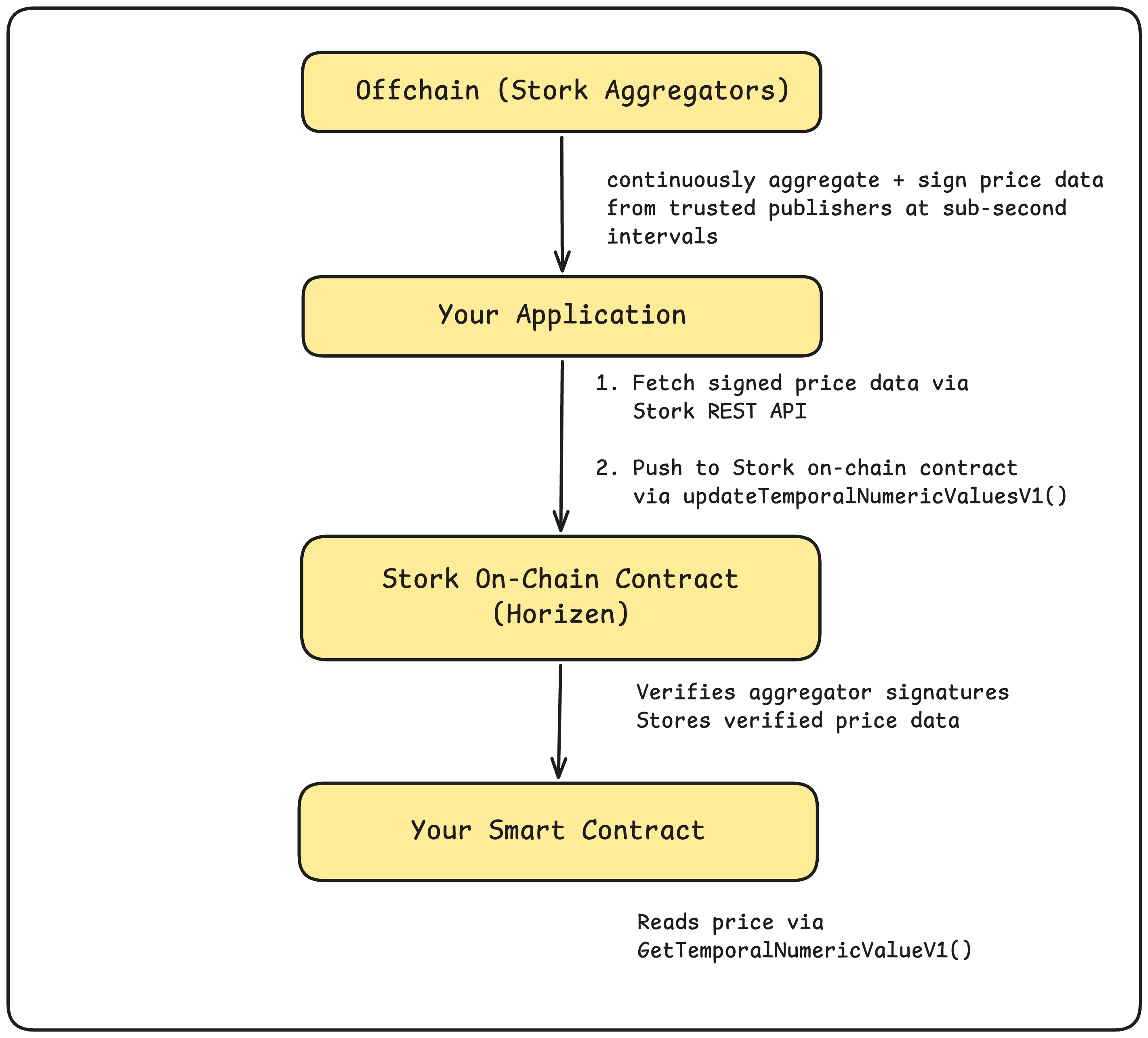
Unlike push oracles (which maintain feeds on-chain at all times), Stork operates on a consumer-driven model: feeds are not posted to the chain continuously. Instead, your application fetches the latest signed data off-chain and pushes it on-chain exactly when needed. This makes it highly cost-efficient: you only pay for the data updates your protocol actually uses.
How Stork Works on Horizen
Contract Addresses
| Network | Stork Contract Address |
|---|---|
| Mainnet Horizen | 0xacC0a0cF13571d30B4b8637996F5D6D774d4fd62 |
| Testnet Horizen | 0xacC0a0cF13571d30B4b8637996F5D6D774d4fd62 |
Both mainnet and testnet share the same Stork contract address on Horizen. Source: docs.stork.network/resources/contract-addresses/evm.
Integration Steps
Step 1: Fetch Data via the Stork REST API
Before pushing anything on-chain, fetch the latest signed price data from Stork's off-chain API. Each response contains a signed payload ready to be submitted directly to the on-chain contract.
API endpoint:
GET https://rest.jp.stork-oracle.network/v1/prices/latest?assets=<ASSET_ID>
Full REST API reference: docs.stork.network/api-reference/rest-api
Available asset IDs (e.g. BTCUSD, ETHUSD) are listed in the Stork Asset ID Registry.
Deriving Feed IDs
Encoded feed IDs are the keccak256 hash of the asset ID string. You can derive any feed ID locally rather than looking it up:
cast keccak "ETHUSD"
# 0x59102b37de83bdda9f38ac8254e596f0d9ac61d2035c07936675e87342817160
The same value is returned as encoded_asset_id in the REST API response.
Step 2: Push Data On-Chain
Once you have the signed payload, submit it to the Stork contract on Horizen using updateTemporalNumericValuesV1. This verifies the aggregator signature and stores the price on-chain.
interface IStork {
    function updateTemporalNumericValuesV1(
        StorkStructs.TemporalNumericValueInput[] calldata updateData
    ) external payable;

    function getUpdateFeeV1(
        StorkStructs.TemporalNumericValueInput[] calldata updateData
    ) external view returns (uint feeAmount);
}
Important: Always call getUpdateFeeV1 first to determine the required fee, then pass that value as msg.value when calling updateTemporalNumericValuesV1. Submitting without sufficient fee will revert with InsufficientFee.
// Get required fee
uint fee = stork.getUpdateFeeV1(updateData);

// Push signed data on-chain
stork.updateTemporalNumericValuesV1{value: fee}(updateData);
Tip: If your protocol uses multiple price feeds, batch them in a single
updateTemporalNumericValuesV1call. This saves gas and ensures all prices are updated atomically in the same block.
Step 3: Read Data On-Chain
Once a feed is updated on-chain, your smart contract can read it using getTemporalNumericValueV1. This function includes an automatic staleness check — it reverts with StaleValue if the stored price is older than the chain's configured freshness threshold.
interface IStork {
    function getTemporalNumericValueV1(
        bytes32 id
    ) external view returns (StorkStructs.TemporalNumericValue memory value);
}

struct TemporalNumericValue {
    // Nanosecond-precision Unix timestamp of the price update
    uint64 timestampNs;
    // Price scaled to 18 decimal places
    int192 quantizedValue;
}
Example — reading ETH/USD price in a Solidity contract:
// SPDX-License-Identifier: MIT
pragma solidity ^0.8.20;

interface IStork {
    struct TemporalNumericValue {
        uint64 timestampNs;
        int192 quantizedValue;
    }
    function getTemporalNumericValueV1(
        bytes32 id
    ) external view returns (TemporalNumericValue memory value);
}

contract PriceConsumer {
    IStork public immutable stork;

    // ETHUSD feed ID — keccak256("ETHUSD"), verify with: cast keccak "ETHUSD"
    bytes32 public constant ETH_USD_ID =
        0x59102b37de83bdda9f38ac8254e596f0d9ac61d2035c07936675e87342817160;

    // Stork contract on Horizen mainnet: 0xacC0a0cF13571d30B4b8637996F5D6D774d4fd62
    constructor(address _stork) {
        stork = IStork(_stork);
    }

    function getEthPrice() external view returns (int192) {
        IStork.TemporalNumericValue memory val =
            stork.getTemporalNumericValueV1(ETH_USD_ID);
        return val.quantizedValue; // 18 decimal places
    }
}
If your contract needs a tighter freshness window than the chain default (e.g. reject prices older than 60 seconds), call getTemporalNumericValueV1 as normal and add your own require check on timestampNs. If you need a looser or fully custom freshness policy, use getTemporalNumericValueUnsafeV1 instead — it returns the stored value without reverting on staleness.
Reference Links
| Resource | URL |
|---|---|
| Stork Documentation | https://docs.stork.network |
| Asset ID Registry | https://docs.stork.network/resources/asset-id-registry |
| REST API Reference | https://docs.stork.network/api-reference/rest-api |
| EVM Contract API | https://docs.stork.network/api-reference/contract-apis/evm |
| EVM SDK Example | https://github.com/Stork-Oracle/stork-external/tree/main/chains/evm/examples/stork |